

Table of Contents
- MT4 and MT5: A Quick Look at Where They Came From
- Charts and Timeframes: 9 on MT4, 21 on MT5
- Order Types and Execution: MT5 Gives You More Room to Work
- Expert Advisors and Automated Trading: MT4’s Strongest Card
- Asset Coverage: Why MT5 Wins If You Trade More Than Forex
- Hedging vs Netting: Clearing Up an Old Misunderstanding
- Strategy Testing: One Thread vs Several
- MT4 or MT5 at QuoMarkets: What It Means for Your Account
- Copy Trading and Social Features: An MT5 Perk Most Guides Skip
- So, MT4 or MT5: Which One Fits You?
- Is MT4 Getting Phased Out? Here’s What’s Actually Happening in 2026
- Final Thoughts
- FAQs
MT4 or MT5 in 2026: Which One Actually Fits How You Trade?
Ask any group of forex traders whether to use MT4 or MT5, and you’ll get a different answer every time. The honest truth is that “MT5 is newer” isn’t a real answer. The right platform comes down to how you trade, what you trade, and which tools you can’t live without.
This guide walks through the real differences so you can pick based on your own trading habits instead of someone else’s checklist.
MT4 and MT5: A Quick Look at Where They Came From

Both platforms come from MetaQuotes Software Corporation, but they were built years apart for different kinds of traders. MT4 launched back in 2005 as a forex-only platform, and it took off fast. Easy to learn, light on system resources, and open enough that anyone could build their own indicators and trading robots. By 2026, it’s passed 10 million downloads on Google Play alone.
MT5 showed up in 2010 with a much bigger goal. Instead of just improving on MT4, MetaQuotes rebuilt it from scratch as a platform that could handle forex, stocks, futures, commodities, and crypto all in one place. Under the hood, it runs on a 64-bit setup that processes more data faster.
Both platforms are still around in 2026, but the ground has shifted. A Brokeree study covering over 900 brokers found that about 68% now offer MT5, while only 40% still offer MT4. MetaQuotes has also quietly stopped handing out new MT4 licenses to brokers altogether, worth keeping in mind if you’re thinking past this year.
So this isn’t really about which platform is “better.” It’s about which one matches how you actually trade.
Charts and Timeframes: 9 on MT4, 21 on MT5
This is the difference you’ll notice the moment you open a chart. MT4 gives you 9 timeframes – 1 minute, 5 minute, 15 minute, 30 minute, 1 hour, 4 hour, daily, weekly, and monthly. That’s plenty for swing and position traders. Scalpers and day traders, though, often want more detail between the 1-minute and 1-hour marks, and that’s exactly where MT5 fills in with extra options like 2-,3-3, 6-, 10-, and 12-minute charts.
The built-in tools follow the same pattern. MT4 comes with 30 indicators and 31 graphical objects, straight from MetaQuotes’ own comparison. MT5 ships with 38 indicators and 44 graphical objects. So if you stick strictly to what’s built in, MT5 gives you more from day one.
Here’s the part most comparisons skip, though: both platforms let you add custom indicators. An experienced MT4 trader can easily build or install whatever’s missing. So the real question isn’t which platform has more tools out of the box – it’s whether you’d rather have them preloaded or build your own setup from outside sources.
Order Types and Execution: MT5 Gives You More Room to Work
The gap between the two becomes obvious once you look at how trades actually get placed and managed. MT4 offers four pending order types – Buy Limit, Sell Limit, Buy Stop, Sell Stop – which cover most standard entries. MT5 adds two more: Buy Stop Limit and Sell Stop Limit. These let you set a stop order that flips into a limit order once it’s triggered, instead of firing at market price. Useful if you’re trading breakouts and want to control slippage.
Fill policies show an even bigger gap. MT4 only has one: Fill or Kill – your order either fills completely at your price or doesn’t go through at all. MT5 gives you three: Fill or Kill, Immediate or Cancel, and Return. Immediate or Cancel grabs whatever’s available at your price and drops the rest, which helps in fast-moving markets. Return sends back whatever wasn’t filled, and that leftover stays open depending on your broker’s rules. For someone placing simple manual trades, none of this matters much. For traders running automated strategies across shifting liquidity, it matters a lot.
Expert Advisors and Automated Trading: MT4’s Strongest Card
This is where MT4 earns real credit. Nearly twenty years of traders and developers building EAs, indicators, and scripts in MQL4 have created a massive library. If you’ve spent years building or buying EAs that work for you, that’s real value, and switching away from it isn’t free. MQL4 doesn’t translate directly into MT5’s MQL5 – converting takes time, testing, and sometimes rewriting the whole thing from the ground up.
That said, MT5’s strategy tester is simply better. It runs on multiple processor cores at once, so backtests finish much faster. It also uses real tick data instead of simulated ticks, which gives far more accurate results, especially around news events or thin liquidity. MT4’s tester runs on a single thread and tests one pair at a time. If you’re starting from zero, MQL5 is the smarter foundation – it supports object-oriented coding, handles multi-threading on its own, and MetaQuotes keeps actively updating it.
The fair way to look at it: traders with an existing MT4 EA library have good reason to stay put. Traders just getting into automated trading should start on MT5.
Asset Coverage: Why MT5 Wins If You Trade More Than Forex
MT4 was built for spot forex and CFDs, and it does that job well, but it was never meant to go beyond it; the code itself caps what’s possible. MT5 was designed from the start to handle stocks, futures, options, commodities, crypto, and indices, all alongside forex. As more retail traders branch out into gold, indices, and crypto in 2026, this becomes a real sticking point for a lot of people.
If forex majors, minors, and a few exotic pairs are all you trade, MT4 already gives you everything you need. But if your trading has grown beyond that, or might soon, MT5 is really the only option between the two; you simply can’t trade stocks or futures on MT4. As more traders diversify, MT5 keeps pace with where trading is heading.
Hedging vs Netting: Clearing Up an Old Misunderstanding
This caused real confusion when MT5 first came out, and the myth still floats around. MT4 defaults to hedging mode, letting traders hold both a buy and a sell on the same instrument at once. That’s standard practice in a lot of retail trading cultures, especially across Southeast Asia and the Middle East.
When MT5 first launched, it only offered netting mode, one net position per symbol, and traders pushed back hard enough that MetaQuotes eventually added hedging to MT5 too. By 2026, MT5 supports both hedging and netting, and which one you get depends on your broker’s setup. Most modern brokers, QuoMarkets included, configure MT5 with hedging turned on. So the old complaint doesn’t really apply anymore for most traders. If your broker runs MT5 with hedging enabled, you keep the flexibility you’re used to while gaining everything else MT5 offers.
Strategy Testing: One Thread vs Several
Backtesting isn’t something discretionary traders think about much, but for anyone running automated strategies, it can make or break the decision. MT4’s tester runs on one thread, tests one instrument at a time, and relies on modelled tick data. The results point you in the right direction but lack precision, especially during volatile news events or in thin markets.
MT5’s tester spreads the workload across multiple cores, so it runs noticeably faster. It also uses real tick data rather than interpolated data, which means a much more realistic picture of how your EA would have actually performed. It can also test across multiple correlated currency pairs at once instead of making you run and piece together separate tests. None of this matters for manual trading. For algorithmic traders, it’s the difference between an educated guess and real confidence in your numbers.
MT4 or MT5 at QuoMarkets: What It Means for Your Account

Both platforms are available across QuoMarkets’ account types in 2026, with one exception: the Limitless account is MT5 only and in USD. If Limitless leverage and conditions interest you, MT5 is automatically your platform. Outside of that, every other account type supports both platforms and all base currencies – USD, THB, JPY, EUR, GBP.
The order type gap is worth noting again. All six pending order types, including Buy Stop Limit and Sell Stop Limit, only exist on MT5. If your strategy depends on conditional entries with slippage control, that’s MT5 territory. Copy trading through SocialTrading.AI works on either a live MT4 or MT5 account, so MT4 users aren’t shut out there. Both platforms run on Windows, Mac, Android, and iOS, with access to over 1,300 instruments.
Bottom line: if you’ve got MQL4 tools you depend on, MT4 still works fine for you. If you want Limitless or the full set of order types, MT5 is the way to go.
Copy Trading and Social Features: An MT5 Perk Most Guides Skip
Most comparisons stop at indicators and order types, but there’s a social side to MT5 that affects day-to-day use. MT5 connects natively to the MQL5 community – a built-in marketplace for signals, EAs, and copy trading. MT4 has nothing like this built in. If you want to browse signal providers or follow a strategy through the community marketplace, you’re doing it on MT5.
The built-in economic calendar is another small thing that changes how you trade day to day. Instead of keeping a browser tab open for news, the calendar lives right inside MT5 and updates live. For traders who plan around economic releases, that removes a small but constant annoyance. MT5 brokers building copy trading tools, including QuoMarkets’ social trading, are built around MT5’s account structure. You can use copy trading on either platform at QuoMarkets, but MT5 gives you a fuller social experience.
So, MT4 or MT5: Which One Fits You?
The choice should come down to your own trading habits, not a generic feature list. Here’s a simple way to think about it in 2026.
Go with MT4 if you’ve already built a library of MQL4 EAs that work and aren’t worth migrating. Go with MT4 if you trade only forex and CFDs with no plans to branch out. Go with MT4 if you’re comfortable with the interface, don’t need extra timeframes, and like having access to MT4’s huge library of existing custom indicators. These are all legitimate reasons, and plenty of experienced traders are perfectly well served staying where they are.
Go with MT5 if you’re starting from scratch with no legacy tools and want a platform that MetaQuotes is actively building on. Go with MT5 if you trade, or want to trade, more than just forex – stocks, indices, crypto, commodities. Go with MT5 if the Limitless account at QuoMarkets appeals to you. Go with MT5 if you’re serious about backtesting automated strategies or want to use copy trading and social features. Go with MT5 if you want a built-in economic calendar and a broader toolkit without hunting for third-party add-ons.
And running both is completely fine, too. If your broker allows it, you can keep MT4 for your existing EAs and open MT5 for multi-asset trading or Limitless access. Nobody’s making you pick a side forever.
Is MT4 Getting Phased Out? Here’s What’s Actually Happening in 2026
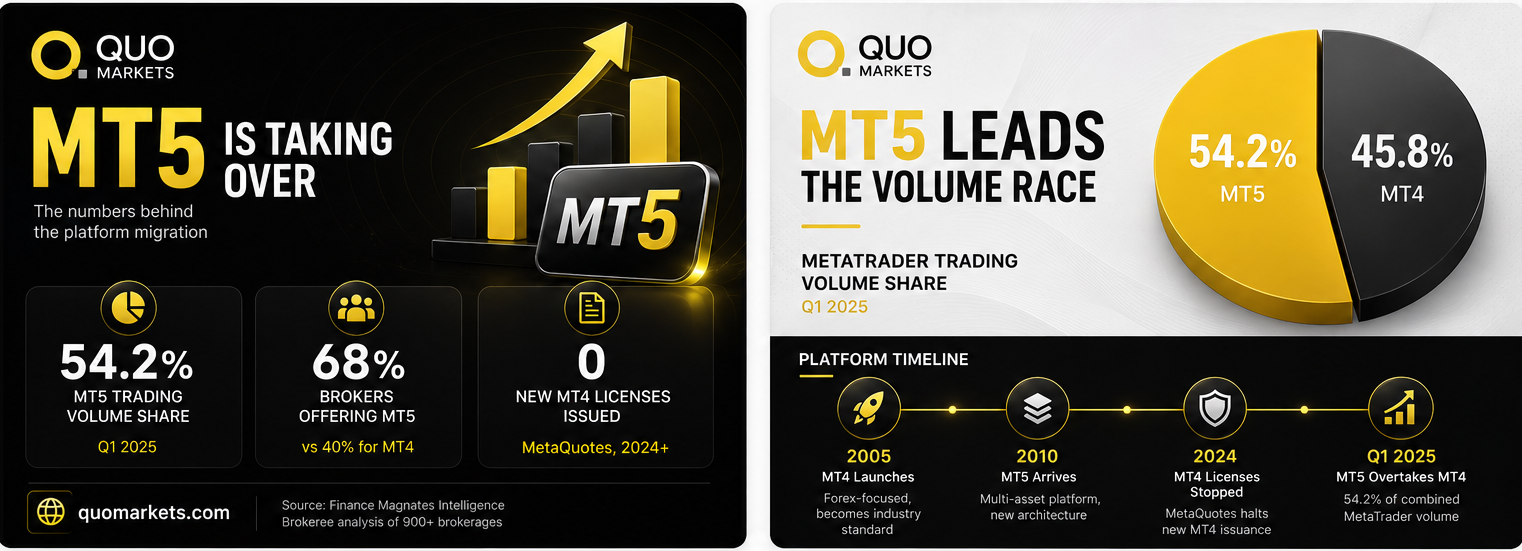
This question deserves a straight answer. MetaQuotes has stopped issuing new MT4 white-label licenses, meaning any broker launching today can only offer MT5. MT4 is now in maintenance mode – no new features, no active security upgrades beyond critical patches. It’s not being shut down, but it’s also not growing anymore.
The numbers back this up. Finance Magnates Intelligence reported that MT5 overtook MT4 in combined trading volume back in Q1 2025, taking 54.2% of the total. That shift has been building for a while now. MT4 isn’t disappearing tomorrow – too many traders rely on it, the EA ecosystem is too established, and too many brokers still support it. But anyone starting fresh in 2026 is learning a platform that’s no longer evolving. It’s something to keep in mind, not something to panic over.
Final Thoughts
It really comes down to one question: are you protecting a setup you already have, or building something new? If you’ve got years of MQL4 EAs, a workflow that works, and your trading stays within forex and CFDs, MT4 still makes complete sense. It works, and it’ll keep working for a long time.
If you’re starting fresh, trading across multiple markets, eyeing the Limitless account, or planning to backtest strategies seriously, MT5 is where things are heading. It’s where MetaQuotes is putting its resources, where new broker licenses are going, and where the volume has already moved. QuoMarkets fully supports both platforms in 2026, so your decision can be based on what you actually need, not on what’s available.
FAQs
What’s the main difference between MT4 and MT5?
MT4 is built mainly for forex and CFDs. MT5 covers multiple asset classes, including stocks, commodities, futures, and crypto, plus more timeframes, more indicators, a faster strategy tester, and a built-in economic calendar.
Can I use MT4 Expert Advisors on MT5?
Not directly. MT4 EAs are written in MQL4, and MT5 runs on MQL5, so they’re not compatible out of the box. Some EAs can be converted, but it takes real development work, testing, and sometimes a full rewrite. If you’ve got a solid MT4 EA library, weigh that migration cost carefully before switching. If you’re building new strategies from zero, MQL5 is the better place to start – it’s more capable, supports object-oriented programming, and MetaQuotes keeps it updated.
Does MT5 support hedging?
Yes. MT5 supports both hedging and netting, depending on how your broker sets it up. Most brokers, QuoMarkets included, now run MT5 with hedging enabled by default.
Which platform is better for beginners?
By 2026, MT5 is generally the better starting point. MT4 used to be the beginner’s pick because of its simpler interface, but most brokers now default to MT5, and learning on a platform that’s actively developed and supports multiple markets sets you up better for the long run.
Is MT4 still supported in 2026?
Yes, plenty of brokers, including QuoMarkets, still support it, but it’s in maintenance mode. MetaQuotes isn’t issuing new licenses for it anymore, and all future development is going into MT5.