

Table of Contents
- What Is MetaTrader 5?
- Main MetaTrader 5 Features
- Benefits of MetaTrader 5
- Final Remarks
- FAQs
MetaTrader 5 Features: Everything Traders Need to Know
MetaTrader has been a core part of online trading for years, but the platform has evolved far beyond its early versions. While MT4 became the go-to choice for forex traders, MetaTrader 5 was developed to meet the demands of modern markets, offering access to more asset classes, stronger analytical tools, and a more advanced trading environment overall.
Whether you’re new to trading or ready for a platform with greater flexibility, understanding MetaTrader 5 features helps explain why so many traders have made the switch.
What Is MetaTrader 5?
MetaTrader 5 is a multi-asset trading platform created by MetaQuotes Software Corp. and released in 2010 as the successor to MetaTrader 4. While MT4 was mainly built for forex trading, MT5 was designed to support a much wider selection of markets, including stocks, futures, commodities, and indices, all inside one platform.
That difference is more important than many traders realize at first. Instead of using separate platforms for different asset classes, MT5 brings everything together in a single workspace with shared charts, analytics, automation tools, and execution features. Brokers that provide MT5 give traders access to infrastructure designed for today’s fast-moving financial markets.
Main MetaTrader 5 Features

Multi-Asset Trading with MT5
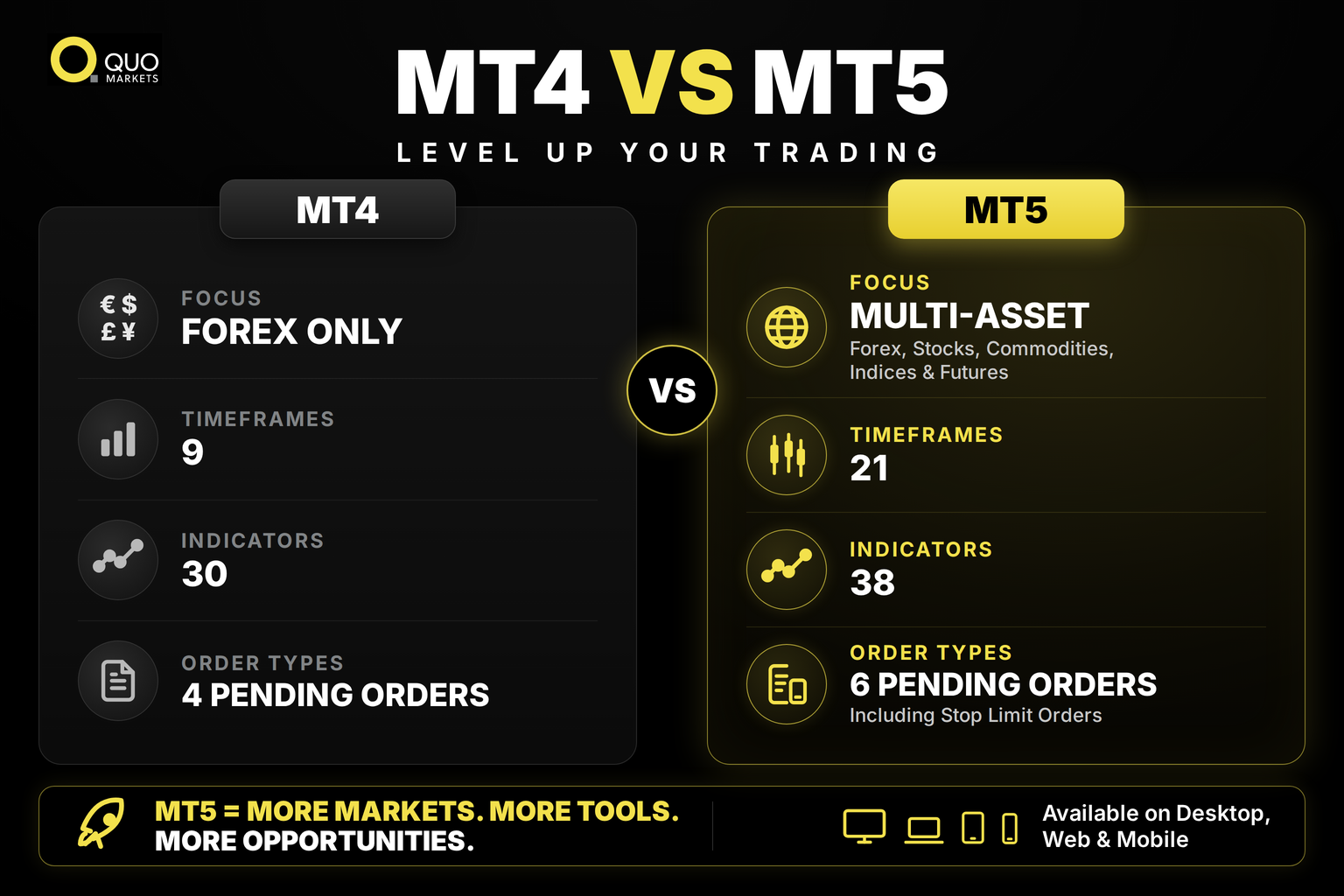
One of the biggest advantages of MT5 is its built-in support for multiple asset classes. MT4 was originally developed for forex, although many brokers later expanded it to CFDs. MT5 was created from the start to support forex pairs, stock CFDs, commodities like gold and oil, equity indices, futures, and more.
This is especially useful for traders who want diversification. Someone trading both EUR/USD and crude oil can manage everything from a single account and platform, rather than switching between systems.
For traders using QuoMarkets, MT5 allows seamless access to forex, commodities, and indices inside a single environment. The platform’s reporting tools, margin calculations, and execution system are all designed with multi-asset trading in mind.
MT5 also supports both hedging and netting account systems, giving traders the flexibility to manage positions according to their preferred strategy.
MT5 Charting and Technical Analysis Tools
Charting is one of the areas where MT5 truly stands out. The platform includes 21 timeframes, compared to MT4’s 9. Traders can study price action from one-minute charts all the way up to monthly charts without limitations.
MT5 also comes with 38 built-in technical indicators. These include trend tools like Moving Averages and Bollinger Bands, as well as oscillators such as RSI, MACD, and Stochastic. In addition, traders get access to 44 analytical objects, including Fibonacci retracements, Gann tools, trend channels, and Elliott Wave tools.
Customization is another major strength. Traders can combine multiple indicators on the same chart, apply indicators to other indicators, create alert conditions, and save chart templates for instant use later.
Visual settings can also be fully adjusted, including colors, chart styles, and grid layouts. MT5 also connects charting directly to trade execution, allowing traders to open and manage positions straight from the chart window.
The platform additionally supports tick data analysis and tick-based tools integrated directly into the interface.
Order Types and Trade Execution in MT5
Experienced traders often need more precision than simple market orders provide. MT5 includes a wide range of order types designed to give traders greater control over execution.
The platform supports Buy Stop, Buy Limit, Sell Stop, Sell Limit, Buy Stop Limit, and Sell Stop Limit pending orders. The Stop Limit orders are especially useful during volatile market conditions because they help traders avoid poor fills during sudden price spikes.
MT5 also allows partial position closing, making it possible to lock in profits on part of a trade while keeping the remaining position open.
Another important feature is MetaTrader 5 market depth, also known as Level 2 pricing. Traders can view bid and ask volumes across multiple price levels, giving extra insight into liquidity and market activity before placing large trades.
MT5 supports several execution modes, including instant execution, market execution, exchange execution, and request execution, depending on broker configuration and market structure. QuoMarkets provides MT5 infrastructure designed for efficient execution across supported instruments.
Built-In Economic Calendar, News, and MQL5
MT5 includes several integrated tools that traders use every day, reducing the need for outside software or browser tabs.
The built-in economic calendar delivers real-time updates on macroeconomic releases, central bank announcements, employment reports, and other market-moving events. Traders can filter events by country, importance level, and date range, making it easier to track events that may impact active positions.
MT5 also provides integrated financial news feeds supplied by brokers, helping traders stay updated without leaving the platform.
Another key feature is MQL5, the platform’s built-in programming language. MQL5 allows traders and developers to create Expert Advisors, custom indicators, and automated scripts for trading and analysis.
The MQL5 Marketplace gives direct access to thousands of ready-made tools, including automated trading systems, indicators, and utilities. Traders can buy, rent, or download tools directly from within the platform. MT5 also supports copy trading through trading signals, allowing users to automatically mirror trades from signal providers.
Benefits of MetaTrader 5
Faster Execution and Cloud Infrastructure
MT5 was designed for higher performance. Its multithreaded strategy tester allows backtesting tasks to run across multiple processor cores at the same time. For traders optimizing automated systems, this can save a significant amount of time.
Expert Advisors can also run through MetaTrader Virtual Hosting (VPS), allowing automated strategies to remain active 24/7 without requiring the trader’s computer to stay online. MT5 also integrates with the MetaTrader Signals service for copy trading.
More Advanced Backtesting
MT5’s strategy tester is far more advanced than the one available in MT4. It supports real tick backtesting using historical tick data instead of simulated price interpolation. This gives traders more realistic testing results and helps avoid over-optimized strategies that fail in live conditions.
The optimization system can test many parameter combinations simultaneously, while 3D optimization graphs make it easier to identify stable settings rather than relying on a single ideal result.
Access Across Multiple Devices
MT5 is available on Windows desktop, web browser platforms, and mobile apps for iOS and Android. The web version requires no installation and syncs with trading accounts in real time.
The MetaTrader 5 mobile app includes charting tools, trade management, and account monitoring, making it possible to manage positions from almost anywhere.
For QuoMarkets clients, this means the trading experience remains consistent whether using desktop, web, or mobile devices.
Final Remarks
The biggest strengths of MetaTrader 5 come from its flexibility and range of features. The platform combines multi-asset trading, advanced charting, additional timeframes, expanded order types, built-in news and calendar tools, market depth visibility, and full automation support through MQL5.
That’s why discussions about MetaTrader 5 features often lead to the same conclusion: MT5 was built for traders who want more than simple trade execution. From cloud hosting for Expert Advisors to full access through the MT5 web platform, the ecosystem is designed to support traders as they grow and develop more advanced strategies.
FAQs
Can trading be automated on MT5?
Yes. MT5 supports automated trading through the MQL5 programming environment, where traders can create Expert Advisors that execute trades automatically based on predefined rules. The MQL5 Marketplace also offers thousands of ready-made automation tools.
Does MetaTrader 5 support stocks and crypto?
MT5 supports stocks, indices, commodities, forex, and futures trading. Crypto availability depends on the broker. QuoMarkets users can view all available instruments inside the Market Watch section of the MT5 terminal.
What are the main features of MetaTrader 5?
MT5 includes multi-asset trading support for forex, stocks, indices, and commodities, along with 21 timeframes, 38 built-in indicators, 6 pending order types, including Stop Limit orders, a built-in economic calendar, market depth visibility, and the MQL5 environment for Expert Advisors and custom indicators.
Is MetaTrader 5 better than MT4?
For most active traders, yes. MT5 supports more asset classes, more timeframes, more order types, and stronger automation tools. MT4 still remains popular because of its simplicity and long-established ecosystem, but MT5 offers more functionality overall.