Table of Contents
- Setting Up and Funding Your QuoMarkets Account
- What to Expect When Opening a QuoMarkets Account
- How to Open a QuoMarkets Account
- Verifying Your QuoMarkets Account
- How to Deposit Funds Into Your QuoMarkets Account
- Ready to Trade
- FAQs
Setting Up and Funding Your QuoMarkets Account
Opening an account with a new broker should take minutes, not hours. But between decoding account types, picking the right funding method, and going through verification, the process can drag on longer than it needs to. This guide walks you through the whole thing – registration, verification, and depositing funds – in plain language, so you can get to trading without the headache.
QuoMarkets is a multi-asset broker with access to more than 350 markets, covering forex, metals, indices, commodities, cryptocurrencies, and stocks. It supports both MT4 and MT5 on desktop and mobile, which makes it a workable option whether you’re just starting out or already trading with a defined strategy.
Here’s everything you need to know, from creating your account to placing your first trade.
What to Expect When Opening a QuoMarkets Account
- Registration takes just a few minutes through the QuoMarkets website
- You can choose from four account types: Raw, Standard, Zero, and Limitless
- Verification requires one government-issued photo ID
- Funding options include cards, bank transfers, e-wallets, and cryptocurrency
- Minimum deposit amounts vary by payment method, with some starting as low as $1
How to Open a QuoMarkets Account
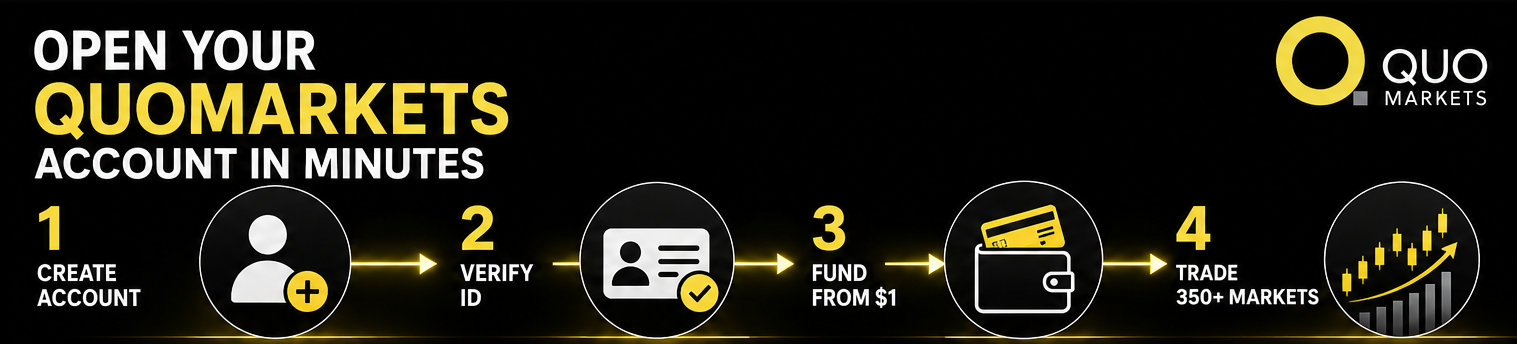
The sign-up process is built to be quick. You don’t need any technical background, and you can complete the whole registration from any device in a matter of minutes.
Step 1: Go to the QuoMarkets Website and Fill In Your Details
Head to the official QuoMarkets website and click the registration button. You’ll be asked to provide your full name, email address, country of residence, and a password. Before you submit, make sure everything matches your official ID documents – it’ll matter when you reach the verification step.
Step 2: Pick the Account Type That Fits How You Trade
QuoMarkets has four real account options: Raw, Standard, Zero, and Limitless. Each one has different spreads, commissions, and leverage settings, so it’s worth taking a moment to compare before you commit.
The Standard account is the most popular starting point. It offers spreads on major pairs from 0.4 pips and commissions starting from zero, which makes it accessible for traders who are still finding their footing. The Raw account comes with tighter spreads and a commission of $3 per side – a better fit for active traders focused on keeping execution costs low.
The Zero account delivers zero spreads on 12 instruments for most of the trading day, with a $4 per side commission and dynamic leverage up to 1:1000. It’s geared toward scalpers and high-frequency traders. The Limitless account is built for traders who work with limitless leverage and have a solid grip on advanced risk management.
All four accounts support USD, THB, and JPY as base currencies, have a minimum trade volume of 0.01 lots, and include negative balance protection.
Step 3: Confirm Your Email and Log In
After submitting your registration, QuoMarkets will send a confirmation email. Click the link to activate your profile, then log in to your client area – this is where you’ll manage your account, deposit funds, and access the trading platforms.
Verifying Your QuoMarkets Account
Before you can withdraw funds or use all account features, you’ll need to complete identity verification. This is standard practice across regulated brokers and exists to protect both the platform and its clients.
QuoMarkets is licensed by the Financial Services Authority (FSA) in the Seychelles, the Securities and Commodities Authority (SCA) in the UAE, and the Financial Sector Conduct Authority (FSCA) in South Africa. Verification is part of meeting those regulatory obligations.
What You’ll Need
Just one document: a valid government-issued photo ID. A passport, national identity card, driver’s license, or permanent residence card all work.
How to Submit
Log in to your profile at my.quomarkets.com, go to the account verification section, and upload a clear scan or photo of your document. Make sure the image isn’t blurry, cropped, or affected by glare – that’s the most common reason submissions get delayed. Once uploaded, the compliance team reviews your documents and processes the verification. Turnaround is usually quick, though it can depend on submission volumes and document quality.
Completing this step unlocks full account functionality and is required before you can make your first deposit and start trading.
How to Deposit Funds Into Your QuoMarkets Account
Once your account is set up and verified, you’re ready to add funds. QuoMarkets supports a wide range of deposit methods across different regions and preferences, from traditional banking to crypto.
One practical feature worth knowing: there’s no fixed minimum deposit. The minimum amount depends entirely on the payment method you choose, and some options let you start with as little as $1. QuoMarkets also doesn’t charge internal fees on deposits or withdrawals, though third-party processors may apply their own charges depending on the method and region.
Deposit Methods and What to Expect
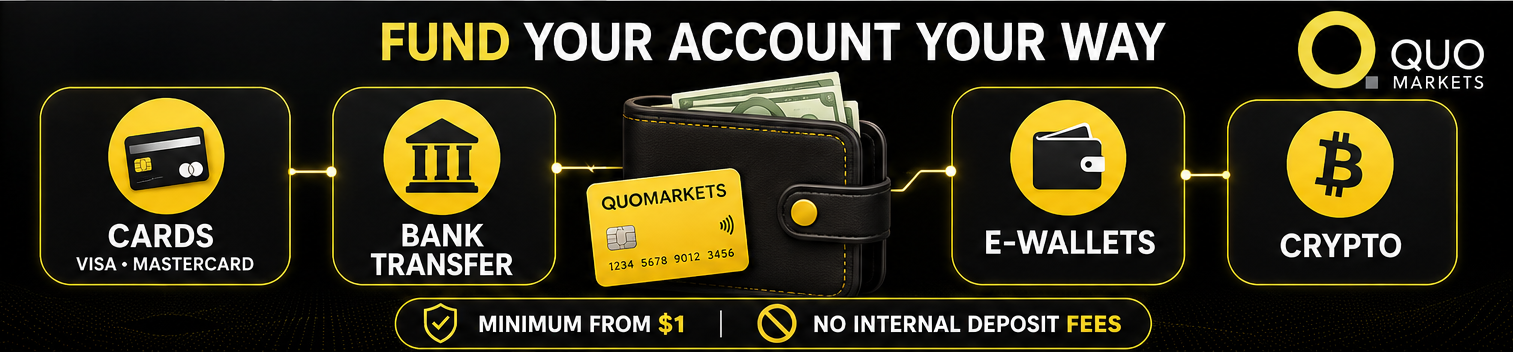
Credit and Debit Cards
Visa and Mastercard are supported, and deposits are usually processed instantly, giving you immediate access to your trading capital. QuoMarkets doesn’t charge fees on card transactions, though your card issuer might apply currency conversion charges if your card’s base currency differs from what you’re depositing.
Bank Transfer
Bank transfers work well for larger deposit amounts and for traders who prefer going through traditional financial channels. Processing takes longer, typically one to three business days, depending on your bank and region. QuoMarkets accepts deposits in any currency and converts them into your account’s base currency.
E-Wallets
Skrill and Neteller are supported, along with regional options like FasaPay and Draginpay. E-wallet deposits are generally instant and sit comfortably between the speed of card payments and the security of a bank transfer. The platform also supports mobile money services, including Safaricom for East African users.
Cryptocurrency
QuoMarkets accepts Bitcoin (BTC), Ethereum (ETH), USDT, and USDC across multiple blockchain networks, including Binance Smart Chain, Ethereum, TRON, Avalanche C-Chain, and Polygon. Minimum deposit amounts for crypto range from $1 to $25 in USDT or USDC, depending on the network.
To deposit crypto, log into your client area at my.quomarkets.com, open the menu, go to the Funds section, and select Deposit. Choose the StableCoin or Coin tile, select your cryptocurrency and network, enter the amount, and confirm. The platform will generate a wallet address for your account. Transfer from your external wallet to that address, and make sure the cryptocurrency and network match on both ends – a mismatch can result in lost funds.
Depositing via Card or E-Wallet
For cards and e-wallets, the process is equally simple. Log in, go to the Funds section, select Deposit, choose your payment method, enter the amount, and follow the steps to authorize the transaction. Most deposits via these methods show up in your trading account almost immediately.
One thing to keep in mind from the start: QuoMarkets follows a Money-In-Money-Out policy, which means withdrawals must go back through the same method used for the original deposit. This is a standard anti-money-laundering requirement, so it’s worth factoring in when choosing your deposit method.
Ready to Trade

Once your deposit is confirmed, the funds appear in your account, and you can start trading. From the client area, you can download or access MT4 or MT5 on desktop or mobile. QuoMarkets also supports TradingView integration and MT5 Supercharts for more advanced charting.
The broker covers more than 350 instruments across forex, commodities, metals, indices, cryptocurrencies, and stocks from U.S., EU, and Asian markets. For those new to the platform, QuoMarkets provides educational resources, including Investing 101 guides, platform tutorials, video lessons, and a trading glossary.
If you’d rather take a hands-off approach to start, QuoMarkets has a built-in copy trading environment where you can browse strategy profiles, view performance rankings, and follow traders whose style matches your risk tolerance.
FAQs
How do I open a QuoMarkets account?
Go to the official QuoMarkets website, fill in the registration form with your personal details, choose your account type (Raw, Standard, Zero, or Limitless – swap-free Islamic options are available depending on the account type), confirm your email, and submit a valid photo ID through your profile at my.quomarkets.com to complete verification.
What Is a Trading Account?
A trading account is a brokerage account that lets you deposit funds and buy or sell financial instruments, such as forex, commodities, indices, stocks, or cryptocurrencies, through an online trading platform.
What is the minimum deposit for QuoMarkets?
There’s no fixed minimum deposit. The amount depends on your chosen payment method, with some allowing you to start from $1. Crypto deposit minimums range from $1 to $25, depending on the blockchain network.
How long does account verification take?
Timelines can vary, but verification is usually completed quickly once all documents are submitted clearly. Uploading legible, unexpired documents without any obstruction is the best way to keep things moving.
What payment methods does QuoMarkets accept?
QuoMarkets supports credit and debit cards, bank transfers, e-wallets, and cryptocurrency deposits, including BTC, ETH, USDT, and USDC across multiple networks.
Disclaimer: Trading forex, CFDs, and cryptocurrencies involves significant risk and may not be suitable for all investors. Leveraged trading can amplify both profits and losses, and traders should make sure they understand the risks involved.